DICESMP FIELD GUIDE

Welcome to your
next adventure.

New here, or just looking for a command? Find the essentials for playing, building, trading, and making yourself at home.

FIRST STEPS

Getting started

Join from the edition you play, link Discord, and you’re ready to explore.

JAVA EDITION
play.dicesmp.online
Numeric address: 185.207.166.133:19023
BEDROCK EDITION
play.dicesmp.online
Port: 12011 · Numeric address: 185.207.166.133:12011
Checking live status… Purpur 1.21.11

Java and Bedrock share the same world. Gameplay mechanics follow Java Edition. For the smoothest experience, use Java 1.21.11 or the latest Bedrock release.

BEFORE YOU PLAY
First join

An nLogin dialog opens in-game. Create a password (5–32 characters) and confirm it.

Returning

Enter your password in the login dialog. No chat commands needed.

Bedrock players are signed in automatically through Floodgate.

CUSTOM TEXTURES & ITEMS

Redownload the resource pack

Force DiceSMP’s ItemsAdder resource pack to download again on Java or Bedrock.

Java Edition

  1. 01

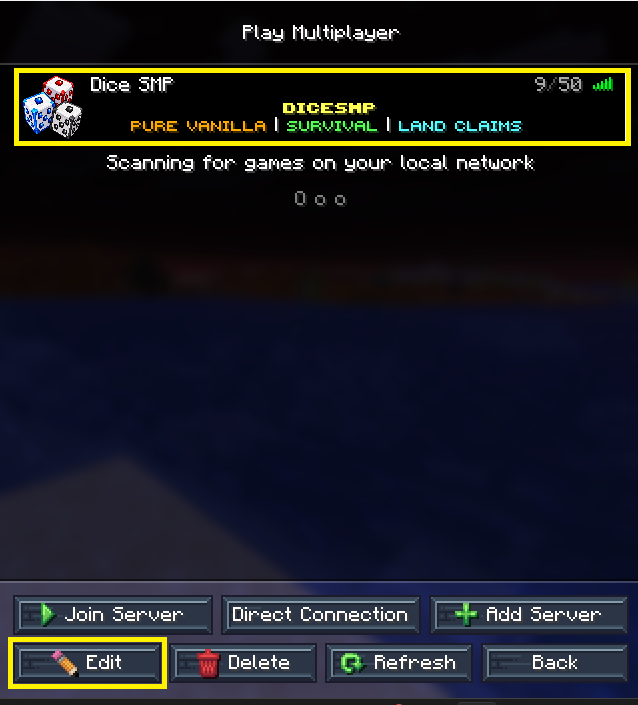
    Edit the server entry

    Open Multiplayer, select your DiceSMP server, and click Edit.

  2. 02

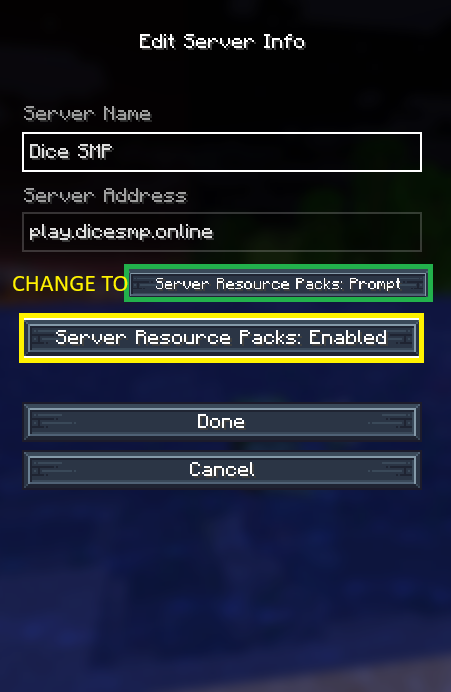
    Change the pack setting

    Set Server Resource Packs to Prompt instead of Enabled, then click Done.

  3. 03

    Join and accept

    Join the server and accept the resource pack prompt. The pack downloads again and custom items show their proper models and textures.

Bedrock Edition

  1. 01

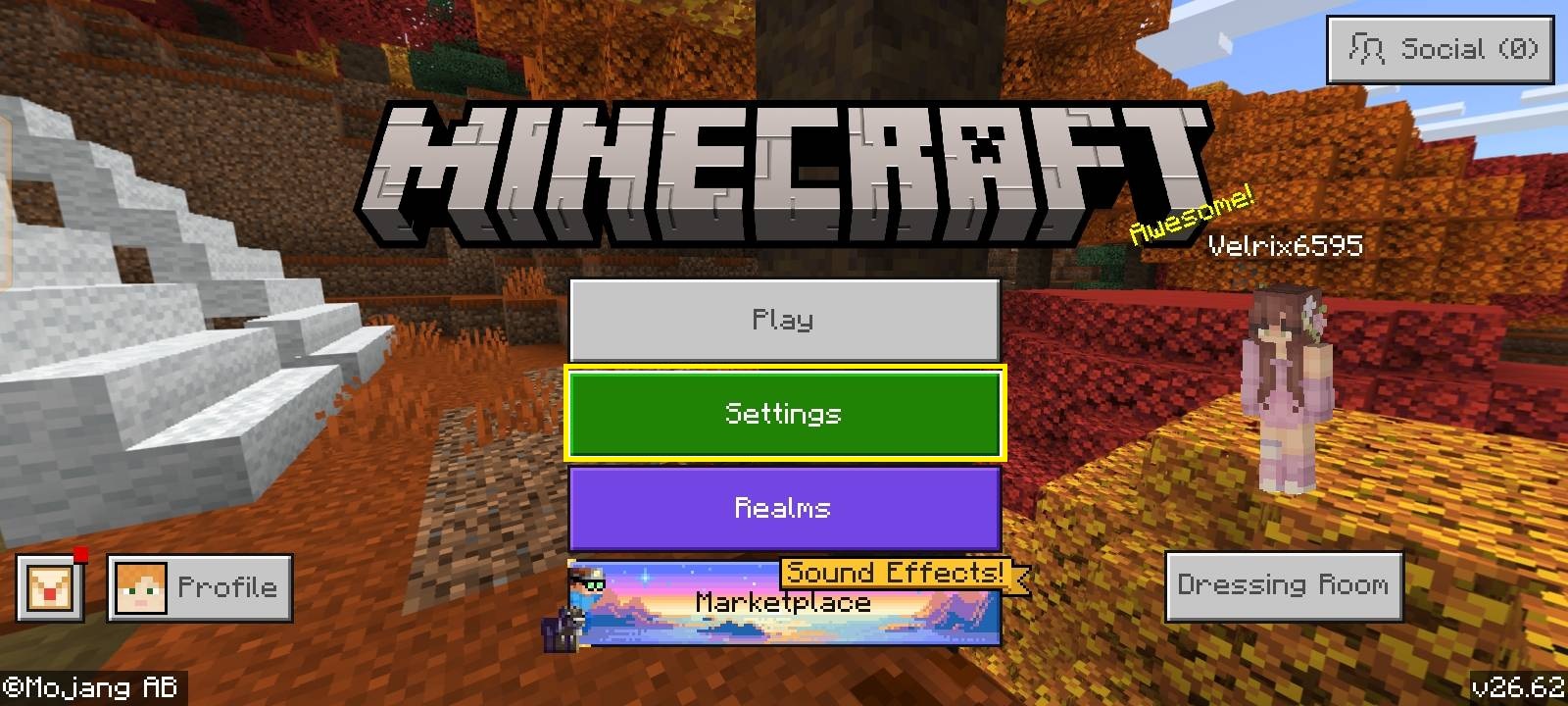
    Open Settings

    From the Minecraft main menu, open Settings.

  2. 02

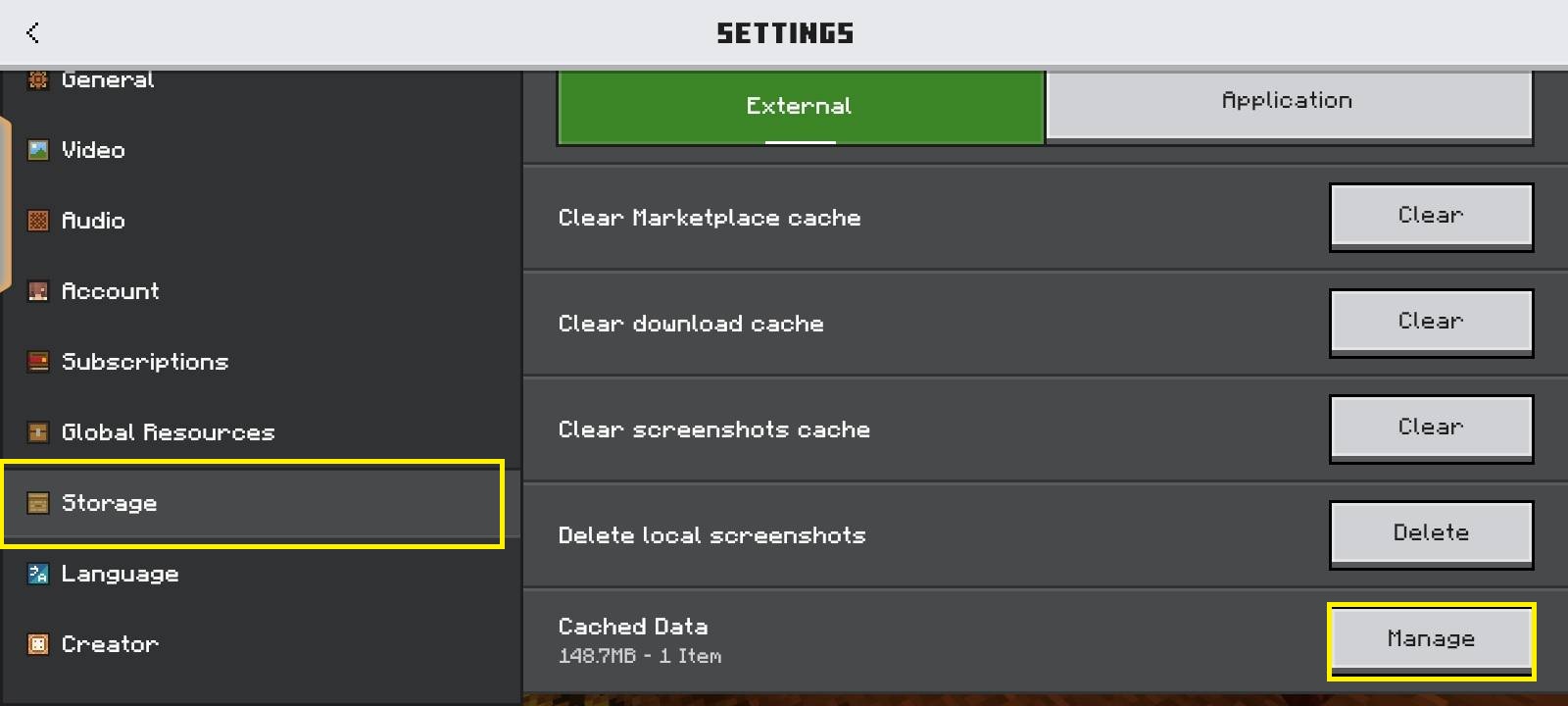
    Go to Storage

    Select Storage, then click Manage next to Cached Data.

  3. 03

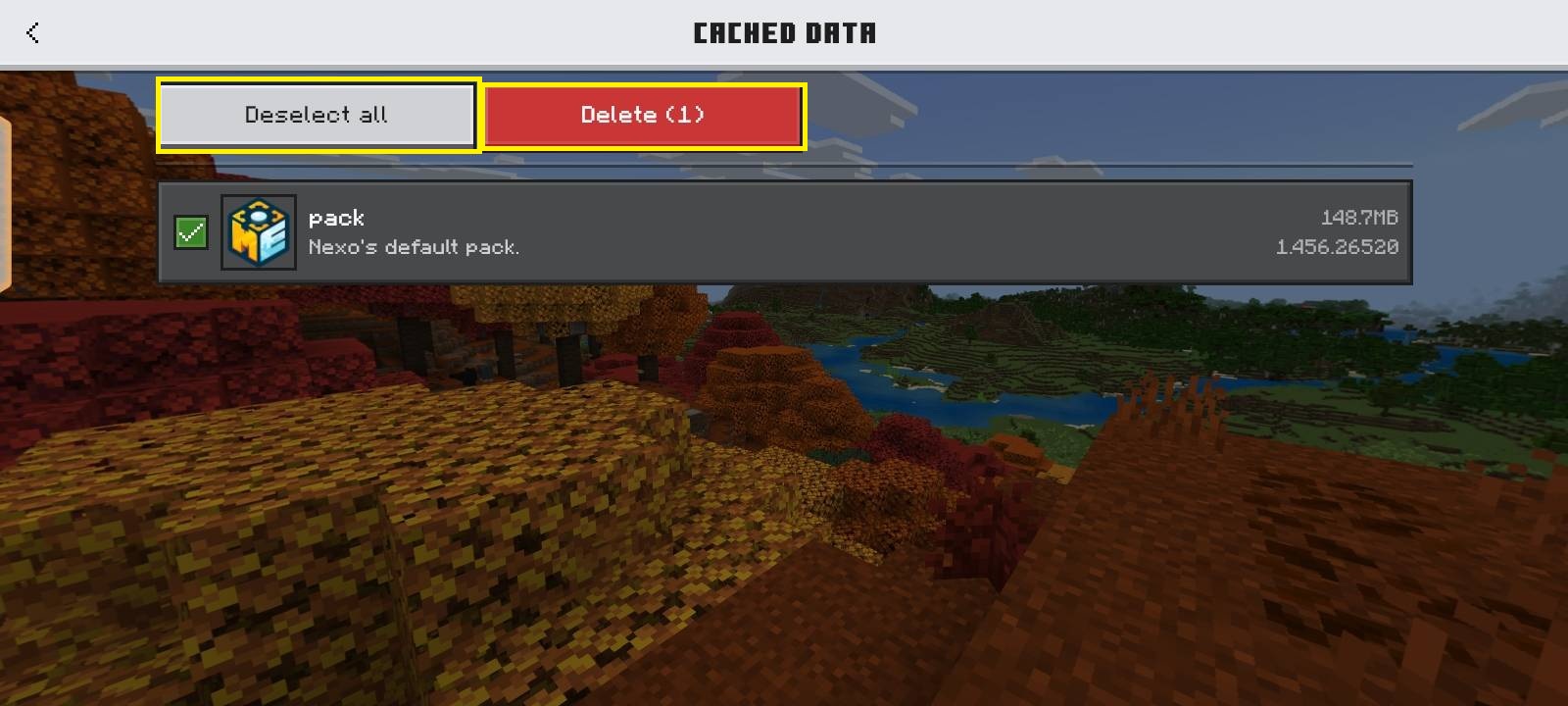
    Delete the cached pack

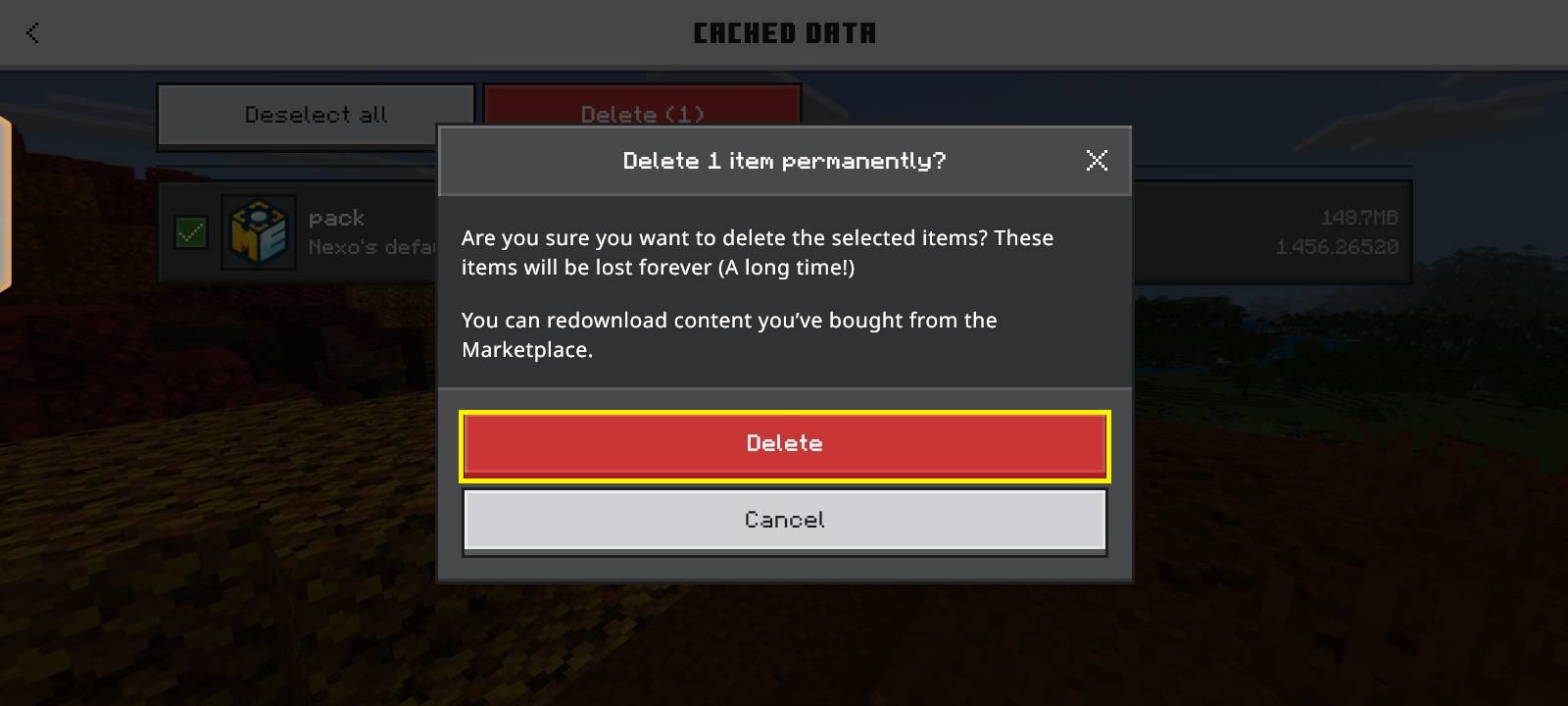
    Select the cached DiceSMP pack in the list and click Delete.

  4. 04

    Confirm the deletion

    Confirm with Delete in the warning dialog.

  5. 05

    Rejoin the server

    Join DiceSMP again. The server sends the pack and your device downloads the latest copy.

Deleting cached data only removes the downloaded copy on your device. The server sends its current pack the next time you join, so custom items and textures come back.

QUICK REFERENCE

Commands & chat

Type these in chat while you’re in the server. Select a command to copy it.

GETTING AROUND
/sethomeSave a home. Start with 3; ranks unlock up to 9.
/tpa <player>Ask to teleport to a player.
/tpahere <player>Ask a player to teleport to you.
/tpacceptAccept an incoming teleport request.
/tpdenyDeny an incoming teleport request.
/tpacancelCancel your outgoing teleport request.
/rtpOpen the random-teleport menu for the Overworld.
/warpsBrowse public warps; use /pwarp for player-warp help.
/sortSort your inventory or a container.
COMMUNITY & EXTRAS
/voteOpen the five server voting links.
/voteshopSpend vote points on rewards like claim blocks.
/rankupOpen the rank menu and check your next milestone.
/bankDeposit, withdraw, or check your banked diamonds.
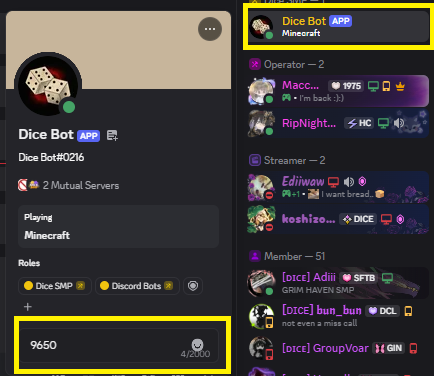
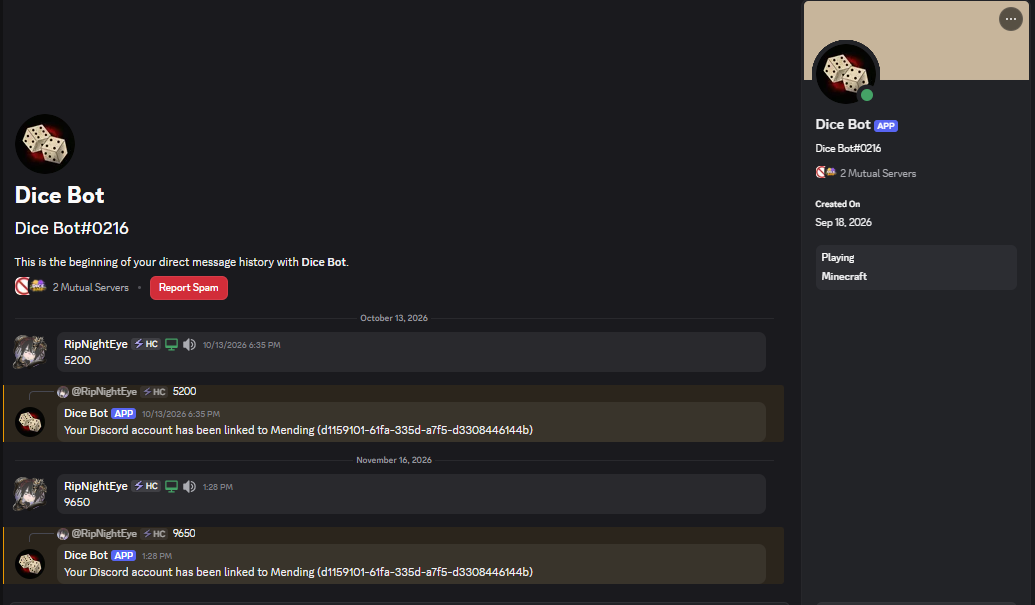
/discord linkLink your Minecraft account to Discord.
/websiteGet a clickable link to this website in chat.
/actpTeleport to one of your AngelChests.
[i] · [item]Show the item you’re holding in chat.
[inv] · [ender]Share your inventory or Ender Chest in chat.
[ping]Show your ping. Java only; this chat tag doesn’t work on Bedrock.
CLAIMS & PROTECTION
/claimslistList your claims, their coordinates, and your claim-block balance.
/abandonclaimDelete the claim you’re standing in and free its claim blocks.
/trust <player>Full build-and-break access in the claim you’re standing in.
/containertrust <player>Use containers, crafting blocks, and animals in your claim.
/accesstrust <player>Use buttons, levers, and beds only.
/trustlistSee who has access to the claim you’re standing in.
/untrust <player>Remove a player’s access again.
POSES, TRAILS & PETS
/sitSit where you stand. You can also right-click stairs, slabs, or carpets with an empty hand.
/lay · /crawlLie down or crawl. Sneak to stand back up.
/trailsOpen the trail menu for particle, block, rain, and wing effects.
/colorOpen the chat color picker for solid colors, gradients, and patterns.
/givepet <player>Offer a tamed pet to another player. They accept with /acceptpet or decline with /declinepet.
ECONOMY & MARRIAGE
/bankOpen your diamond bank. Chat shortcuts: /bank deposit <amount>, /bank withdraw <amount>, or /bank balance.
/coinflipOpen the CoinFlip menu, or start a wager with /coinflip create <diamonds>.
/propose <player>Send a marriage proposal. It stays valid for 24 hours, even if they are offline.
/accept <player>Accept that player’s pending marriage proposal.
/marriageView your marriage info, or check pending proposals with /marriage proposals.
/divorceStart a divorce. Confirm with /divorce confirm within 30 seconds.
PVP & CLANWAR
/warp pvpTravel to the PvP world, where leaving the spawn safezone flags you for PvP.
/warp clanwarTravel to the ClanWar arena and match area.
/clanwar infoSee the current match state, teams, and available kits.
/clanwar leaveForfeit a match and become a spectator. Locked during preparation.
/clanwar spectateWatch a running match if you are not on a team.
/newbie disableEnd your 10-minute new-player PvP protection early.

Player warps are limited to 3 per player. They have a 3-second delay, a 10-second cooldown, and cancel if you move. Use /warps to browse them.

HOW THINGS WORK

Server features

Helpful extras that keep the focus on Minecraft and the community.

Claims & protectionKeep your builds yours

Use a golden shovel to select two corners and create a protected claim. You can own up to 4 separate claims. Claim blocks start at 100, accrue at 100 per hour played, and cap at 80,000; 5 vote points buy 100 more in /voteshop. Unused claims expire after 14 days, and all claims expire after 60 days of inactivity except for players with a large claim-block balance. Creepers and TNT won’t damage the surface or claimed land.

TeamsBuild and adventure together

Teams start at 10 players, 10 team chests, and 1 team warp. Level 2 costs 20 score and raises the limits to 20 players, 20 chests, and 2 warps; level 3 costs 40 score and allows 30 players, 25 chests, and 3 warps. Player kills add team score, and teams can set a home and respawn at their team anchor. The PvP & ClanWar section covers match rules and team scoring in detail.

Combat & newbie protectionKnow when you’re tagged

Attacking or being attacked starts a 15-second combat tag, shown in your action bar and a boss bar. While tagged, teleports and most commands are blocked; logging out counts as dying and drops your inventory, experience, and armor. New players get 10 minutes of PvP protection and can end it early with /newbie disable. Killing the same player more than five times within 20 minutes can trigger a kick for kill abuse.

Chests & tradingOrganize, stock, and sell

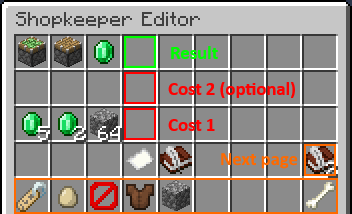
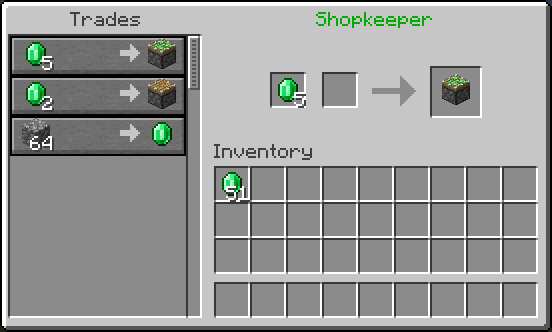
Shopkeepers let you set up item-for-item trades using a hired Wandering Trader and a linked container. Hiring costs 32 emeralds, each trader links to one container within 15 blocks, and there is no per-player shop limit. Some shopkeepers also sell vouchers; right-click one to add 100 claim blocks. See the illustrated setup below.

Diamonds, votes & rewardsSupport the server and earn rewards

Diamonds are used for player trading, the CoinFlip game, and the diamond bank. Each vote gives 1 vote point and 1 Vote Crate key—not a diamond. Vote once every 24 hours on each of five sites: MinecraftServers.org, Minecraft.Buzz, Minecraft-MP.com, Minerank, and minecraft-serverlist.com. Spend 5 points for 100 claim blocks in /voteshop, then open your Vote Crates at /warp crates; their 15 rewards include iron gear, food, diamonds, and a Shopkeeper. Votes also fill the shared Pinata meter—see the Pinata Party card below. ChatGames run every 5–10 minutes with 120-second rounds: a win pays 1 diamond, with a 50% chance of 1 extra and a 5% chance of 10 extra.

Pinata PartyVote together, break it open

Votes also count toward a shared Pinata meter. Every 50 votes, a pinata spawns at /warp pinata after a 5-second countdown. Hit it to earn a roll at these drops—each one rolls independently, so a single hit can bring more than one:

  • 50%Copper block
  • 35%Iron ingot
  • 20%Gold ingot
  • 10%Diamond
  • 5%Netherite scrap
  • 0.3%Mace
Player warps & teleportingMeet up with other players

Essentials handles /home, /tpa, and /tpahere. Homes start at 3 and increase with rank up to 9. Teleport requests expire after 120 seconds, and you can have at most 3 pending at once. Player warps are public destinations: each player can create up to 3 with /setwarp and remove them with /delwarp. Browse them with /warps; warps have a 3-second delay, a 10-second cooldown, and cancel if you move.

Server warpsWhere everything is

Server-run warps cover the main services: /warp shop for the admin shops, /warp crates and /warp votecrate for crates, /warp afk for AFK rewards, /warp pinata for Pinata Parties, /warp leaderboards for the spawn boards, /warp clanwar for matches, and /warp pvp for the PvP arena. Use /warps to browse every public destination, including player-made warps.

Death chests & recoveryKnow what is and isn’t saved

AngelChest protects your items and collects your experience. A chest lasts 10,000 seconds, and you can have up to 5 at once; when a sixth is created, the oldest chest drops its contents. PvP death chests are protected. Use /actp to teleport to a chest, /aclist to list them, or /acfetch to fetch one. If a server issue caused your death, staff may restore lost items; deaths caused by player error aren’t eligible for server-related restoration.

Restart reminders & updatesStay in the loop in-game

The in-game changelog keeps server updates available right in Minecraft, so you don’t need to visit Discord or the website every time something changes. On supported newer Minecraft versions, updates appear through a custom screen/dialog. DiceCustomPlugin also announces scheduled restarts up to 24 hours ahead and shows a boss-bar countdown as restart time approaches.

Voice, chat & custom looksMore ways to hang out

DiscordSRV syncs in-game chat with Discord; use /discord link to connect your account. InteractiveChat supports item, inventory, Ender Chest, and ping tags in chat; its Discord add-on brings supported previews to Discord too. Voice chat is Java-only. ItemsAdder adds custom textures, items, and cosmetics — browse the full cosmetics gallery.

Trails, pets & posesA little personality

Open /trails for particle, block, rain, and wing trails; they hide for 30 seconds when you enter combat. GivePet lets you offer a tamed pet with /givepet <player>, and the recipient confirms with /acceptpet. For downtime, /sit, /lay, and /crawl change your pose—sneak to stand up, or right-click stairs, slabs, and carpets with an empty hand to sit.

Chat colorsMake chat yours

/color opens a picker for solid colors, gradients, and patterns that tint your chat messages. The choice is cosmetic, and you can clear it again with /color reset.

Crossplay & versionsJava and Bedrock together

Geyser and Floodgate let Bedrock players join the Java server; gameplay mechanics follow Java. ViaVersion and ViaBackwards support other client versions, but items or textures may look different when your game version is older or newer than the server. For best results, Java players should use 1.21.11 and Bedrock players the latest version.

Other handy detailsSmall things worth knowing

Clumps combines nearby experience orbs into fewer, larger orbs to make XP collection smoother and reduce the number of entities on the ground. Simple_RTP sends you up to 30,000 blocks from spawn in the Overworld, with a 160-second cooldown and a 5-second countdown; random teleport is disabled in the Nether and End. SkinsRestorer lets players using offline-mode clients display custom skins. CoreProtect keeps activity logs for staff investigations. nLogin adds password authentication because the server runs in offline mode: Java players use in-game dialogs to create a password on first join and sign in when they return, while Bedrock players are signed in automatically through Floodgate. Balloons from DiceCustomPlugin follow your character around.

Spawn leaderboardsSee who’s on top

A ring of holograms around spawn shows the top 10 for monthly deaths, all-time playtime, monthly diamond bank balances, monthly player kills, team score, and monthly votes. The boards refresh every second.

AFK rewardsEarn rewards while idling

Visit /warp afk to enter the AFK zone. Every 5 minutes you get 3 reward rolls; each roll has its own chance. /afk is the normal AFK toggle, not the reward zone.

  • 10%1 Iron Ingot
  • 10%30 Claim Blocks
  • 80%Nothing
Server protectionProtected by Vulcan

DiceSMP is protected by Vulcan.

DIAMONDS, BANKS & BONDS

Economy & marriage

Diamonds are the currency. Bank them, wager them, spend them at spawn, and tie the knot.

Diamond bankKeep your diamonds out of danger

/bank opens a menu with your balance and one-click deposit or withdraw options. The same actions work from chat with /bank deposit <amount>, /bank withdraw <amount>, and /bank balance. Banked diamonds are kept separately from your inventory, so a death does not scatter them. The bank is storage, not an investment—it pays no interest. Monthly bank balances appear on the spawn leaderboards.

CoinFlipWager diamonds on a coin toss

/coinflip opens the CoinFlip menu, where you can browse open wagers or start your own with /coinflip create <diamonds>. You pick heads or tails, and both wagers sit in escrow until the flip resolves; the winner takes the pot. Only diamonds can be wagered. If the menu refuses to open, your rank may be missing the dicecustomplugin.coinflip.use permission—everyone has it by default.

Spawn shop: crops & suppliesTurn farm surplus into gear

Admin shopkeepers near spawn buy crops and sell everyday supplies. These are fixed trades, not player shops.

  • 64 crops10 iron ingots
  • 64 iron ingots10 diamonds
  • 64 crops100 claim-block voucher
  • 32 gold ingots16 books
  • 32 copper ingots32 paper
  • 32 copper ingots32 gunpowder
  • 32 copper ingots16 ender pearls
  • 64 gold ingots32 TNT

The iron trade accepts carrots, potatoes, beetroot, wheat, or cactus. The claim-block voucher trade accepts carrots, potatoes, wheat, or beetroot. The voucher is a separate item that looks like a gold block—right-click it to add 100 claim blocks. It is the only voucher currently sold by the spawn shops.

Spawn shop: rare goodsSpend diamonds and netherite

A second admin shopkeeper trades high-end materials. Bring a full stack of diamonds before you visit.

  • 32 diamonds1 totem of undying
  • 32 diamonds64 wind charges
  • 64 diamonds10 ominous bottles
  • 64 diamonds32 emeralds
  • 64 netherite ingots1 nether star

Ominous bottles are normally rare because trial-chamber drops are nerfed, so the shop is the reliable way to stock up for bad omen runs.

MarriageA partner tag and a shared title

Marriage is a social feature: your partner’s name appears in your nameplate, tab list, and a second line under your name. Use /propose <player>; they accept with /accept <player>. Proposals stay valid for 24 hours and can be sent while the other player is offline—they see it when they next log in. /marriage shows your partner and marriage date, and /marriage proposals lists pending offers. /divorce starts the process and must be confirmed with /divorce confirm within 30 seconds. After a marriage is accepted, a fake “YOU HAVE BEEN BANNED” screen briefly kicks both players; it is a developer joke, never a real ban.

FIGHTS, TEAMS & MATCHES

PvP & ClanWar

Where PvP is enabled, how organized matches run, and which drop rates differ from vanilla.

PvP worldBring only what you can lose

/warp pvp takes you to the dedicated PvP arena. The arena spawn is a safezone where PvP is denied but doors, buttons, and anvils still work. Step outside the safezone and you are in survival and can be attacked; leaving it also grants one-time fall-damage immunity for that transition. Your inventory is shared with the Overworld, Nether, and End, so leave valuables in your bank or a chest first. Spawn eggs are blocked in the arena, natural mob spawning is disabled, and land claims do not apply there. In the Overworld, standing inside a claim stops other players from damaging you. Combat tags still apply: logging out while tagged counts as a death.

ClanWar matchesStructured team battles

/warp clanwar leads to the match arena. Each team holds up to 5 players, and the roster locks when a match starts. A 60-second preparation phase follows, during which players vote for one of four preset kits for 30 seconds. If every player votes, preparation drops to 10 seconds; you can change your vote while voting is open. Friendly fire is off, a scoreboard and tab list track the teams, and the last team standing wins (a draw is possible). Disconnecting eliminates you, while /clanwar leave during the fight forfeits your spot and puts you into spectator mode; leaving during preparation is locked. Players who are not on a team can watch with /clanwar spectate, and /clanwar info shows the current state. The plugin supports up to 9 kits; four are configured right now.

Teams, levels & anchorsGrow from a duo to a faction

Teams start at level 1 with 10 member slots, 10 team chests, and 1 team warp. Level 2 costs 20 team score and raises the limits to 20 members, 20 chests, and 2 warps. Level 3 costs 40 score and allows 30 members, 25 chests, and 3 warps. Each player kill adds 1 score; deaths add nothing, and repeat kills within 60 seconds do not farm extra score. Teams can set a home, respawn at their team anchor, and ally with up to 5 other teams. Use /team to create, invite, and manage yours.

Loot & drop changesVanilla, with a few tweaks

Two drop rates are different from vanilla. Evokers lose their totem drop 50% of the time, so a totem is a 50/50 drop. Ominous bottles are removed from 94% of the drops that would contain them, leaving only a 6% chance. Rank ore counts include coal, iron, copper, gold, redstone, lapis, diamond, emerald, nether quartz, nether gold, and ancient debris, and both normal and deepslate variants count. Ores outside that list do not advance the ore requirement in /rankup.

COAL TO NETHERITE

Rank progression

Meet lifetime totals, then claim your next rank from the in-game rankup menu.

/rankupOpen the rank menu and check your next milestone.

Requirements are lifetime totals. The path runs from Coal to Netherite.

Swipe or scroll sideways to see all columns

RankOres minedVotesPlayer killsUnlocks
Coal———Start with 3 homes
Copper50035+1 home (4 total)
Iron1,5001025Silk Touch Kit + chat emoji
Gold3,0002575+2 homes (6 total) + /condense
Diamond7,50050200Colored name
Emerald15,000100500+3 homes (9 total)
Netherite30,0002001,000Master Kit

Votes are counted by PinataParty. The Iron Silk Touch Kit includes an Efficiency V, Unbreaking III, Mending Silk Touch pickaxe. The Netherite Master Kit includes Protection V Netherite armor and a Sharpness V sword.

PLAYER-TO-PLAYER SHOPS

Set up a Shopkeeper

Make an item-for-item shop using a Wandering Trader and a container.

  1. 01

    Hire a Wandering Trader

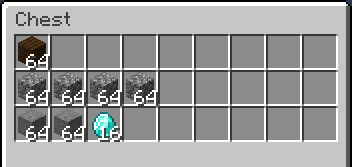
    Hold 32 emeralds and shift-right-click a Wandering Trader to hire them. Place a chest, double chest, or barrel for the shop’s stock.

  2. 02

    Link the stock container

    Hold the trader egg and right-click the container you placed. Then place the trader where you want them to stand; keep the container within 15 blocks. Each trader can link to one container, and there is no per-player shop limit.

  3. 03

    Stock items and set the trade

    Put the items you want to sell into the linked container. Shift-right-click your trader to open the editor. Set the Result (what the customer receives), Cost 1 (the required payment), and optional Cost 2. Click item stacks to adjust trade quantities, up to 64. You need at least one item for each trade slot you configure.

THE OFFICIAL RULES

Minecraft server rules

These are the official DiceSMP rules. Please read them before playing.

Immediate IP ban: Breaking any rule below results in an automatic IP ban. The server uses automated logging, and the owner states there are no exceptions or warnings.

01

Server & community

Help keep the community kind, friendly, and peaceful.

  • Respect each other. Treat all players with kindness. Bullying, harassment, and toxic behavior are not tolerated.
  • No below-the-belt jokes. Keep chat friendly. Offensive, highly personal, or deeply hurtful jokes are prohibited.
  • No drama. Keep personal arguments out of global chat so the community stays peaceful and fun.
02

In-game gameplay

Play fairly and don’t use traps or exploits against other players.

  • No cheating. Modded clients, X-ray packs, hacked clients, and unapproved third-party modifications are forbidden.
  • No duping. Do not exploit game mechanics or glitches to duplicate items, blocks, or currency.
  • No spam killing. Do not repeatedly kill the same player to ruin their experience or farm them.
  • No TP trapping. Do not set traps that instantly kill players who accept a teleport request using /tpa.
  • No AngelChest trapping. Do not trap another player’s AngelChest or build around or underneath it to steal their gear or kill them when they retrieve it.
  • No pWarp voids. Do not set a player warp with /pwarp that sends players directly into the void, lava, or a fatal drop.
03

Performance & farm restrictions

Build responsibly and protect server performance.

  • No overpowered farms. Massive, unrestricted automated farms that consume excessive server resources are not allowed.
  • No iron farms. Traditional and villager-based iron golem farms are prohibited.
  • No lag machines. Redstone loops, entity crammers, or other contraptions designed to reduce server TPS are prohibited and result in a permanent ban.

For reports, concerns, or questions, open a ticket in the DiceSMP Discord ↗.

EXPLORE, BUILD, MAKE IT HOME

World & claims

Know where to build, how protection works, and which worlds support claims.

Overworld

Use /rtp for a random destination up to 30,000 blocks from spawn. Land claims are enabled here.

Nether

Open exploration. Land claims are disabled, so watch your builds and your inventory.

End

Open exploration. Land claims are disabled; bring what you need and leave nothing valuable unattended.

Your claims

Protect land with a golden shovel. You can own 4 claims. Claim blocks start at 100, accrue at 100 per hour, cap at 80,000, and can be bought with vote points. Unused claims expire after 14 days; all claims expire after 60 inactive days, with an exception for large balances. See how to claim land for the steps.

GOLDEN SHOVEL, TWO CLICKS

How to claim land

Mark your base so only you and the players you trust can build there.

  1. 01

    Hold a golden shovel

    Land claims are marked with a golden shovel. If you don’t have one, craft it with 3 gold ingots and 2 sticks. While claiming, the shovel marks corners instead of digging.

  2. 02

    Click two opposite corners

    Left-click (punch) one corner of the area you want to protect, then right-click the opposite corner. The claim is created as soon as you place the second corner. Pick corners diagonally across from each other so the claim covers the whole base.

  3. 03

    Spend claim blocks

    Each claim costs claim blocks equal to its area, so a 10×10 claim uses 100 blocks. New players start with 100 claim blocks, earn 100 per hour played up to 80,000, and can buy 100 more for 5 vote points in /voteshop.

  4. 04

    Trust your friends

    Use /trust <player> for full build access, /containertrust <player> for containers and animals, or /accesstrust <player> for buttons, levers, and beds. /trustlist shows who has access where you stand, and /untrust <player> removes it again.

Overworld only. You can own up to 4 separate claims; review them with /claimslist and remove the one you’re standing in with /abandonclaim. Claims cover the land from bedrock to build limit, so your builds are protected above and below. Unused claims expire after 14 days, and all claims expire after 60 inactive days except for players with a large claim-block balance.

WHEN SOMETHING GOES WRONG

Troubleshooting

Quick fixes for the usual connection, login, and display problems.

Can’t connectAddress, port, and version

Java players join play.dicesmp.online; Bedrock players use the same address with port 12011. Java is best on 1.21.11. ViaVersion and ViaBackwards allow other versions, but very old or very new clients may see missing items, textures, or UI elements. If the server is restarting, wait for the boss-bar countdown to finish and reconnect. A failed first attempt is usually a version mismatch or a typo in the address.

Login & account helpPasswords and Bedrock sign-in

The server runs in offline mode, so nLogin adds password protection. Java players create a password through the in-game dialog on first join and sign in when they return. Bedrock players are signed in automatically through Floodgate. Staff will never ask for your password, and you should never share it in chat or Discord. If you are locked out, open a Discord ticket instead of creating duplicate accounts.

Missing textures or custom itemsAccept the resource pack

ItemsAdder supplies custom models and textures through the server resource pack. Accept the pack prompt when you join; without it, custom items keep their function but may look like ordinary vanilla items. If the download fails, reconnect and accept the prompt again, and make sure your client is allowed to use server resource packs. Switching game versions can also make custom content render incorrectly—try 1.21.11 on Java if something looks wrong. To force a fresh download, see Redownload the resource pack.

Voice chat & Bedrock limitsWhat crossplay does not carry over

Proximity voice chat is Java-only. Bedrock players cannot use it, and they also cannot use Java-only chat tags such as [i], [inv], or [ping]. Chat itself, claims, shops, crates, and combat work for both editions. If voice chat is silent on Java, check that the mod is installed and that your microphone is selected in its settings.

Lag, bugs & reportsGet help without guessing

For lag, lower your render and simulation distance, disable heavy shaders, and check whether a restart is counting down. For a persistent problem, open a Discord ticket with the time, world, coordinates, and what you were doing. Staff can inspect CoreProtect logs for block and container changes. Report bugs and suspected cheaters privately through a ticket rather than confronting players in chat.

QUICK ANSWERS

Frequently asked questions

Still stuck? The Discord ticket team can help.

Can Java and Bedrock players play together?

Yes. Join play.dicesmp.online. Bedrock uses port 12011. Server mechanics are based on Java Edition.

How many claims and homes can I have?

You can own up to 4 separate land claims in the Overworld. Homes start at 3 and increase with rank: Copper 4, Gold 6, and Emerald 9.

How do I claim land?

Hold a golden shovel, left-click one corner of the area, then right-click the opposite corner. Claims cost claim blocks equal to their area, and new players start with 100. Manage them with /claimslist and /abandonclaim, and use /trust <player> to share access. This works in the Overworld only.

Do the Nether and End have land claims?

No. GriefPrevention claims are enabled in the Overworld only. The Nether and End are open exploration without land claims.

How do I rank up?

Open /rankup in game and meet the lifetime ore, vote, and player-kill requirements for your next rank. The path runs from Coal to Netherite and also unlocks more homes and kits.

What do I get for voting?

Each vote gives 1 vote point and 1 Vote Crate key. Spend 5 points for 100 claim blocks in /voteshop, then use your keys at /warp crates.

How does the diamond bank work?

Run /bank to open your personal diamond bank. Deposit diamonds from your inventory, withdraw them again, or check your balance. The bank keeps them separately from your inventory, and monthly balances appear on the spawn leaderboards.

How does CoinFlip work?

Run /coinflip to open the menu, or /coinflip create <diamonds> to start a wager. Your diamonds are held in escrow while you pick heads or tails; the winner takes the pot.

What do the spawn shops sell?

Admin shopkeepers near spawn trade 64 crops for 10 iron ingots, 64 iron ingots for 10 diamonds, and 64 crops for a 100-claim-block voucher. They also sell books, paper, gunpowder, ender pearls, TNT, totems, wind charges, ominous bottles, emeralds, and nether stars for gold, copper, diamonds, or netherite.

Can I get married in-game?

Yes. Use /propose <player> and have them accept with /accept <player>. Proposals last 24 hours and can be sent while the other player is offline. Married players show a partner suffix; /divorce asks for confirmation within 30 seconds. The fake ban message after marrying is a developer joke, not a real punishment.

What is ClanWar?

/warp clanwar takes you to the match area. Each team holds up to 5 players, and a 60-second preparation phase starts the match. Players vote on one of four kits for 30 seconds, and the vote ends early if everyone agrees. Friendly fire is off; disconnecting or leaving eliminates you, and players not in the match can watch with /clanwar spectate.

What is the PvP world?

/warp pvp takes you to the PvP arena. Its spawn safezone blocks PvP; once you leave it, you are in survival and can be attacked. Your inventory is shared with the other worlds, spawn eggs cannot be used there, and there are no land claims.

What is in a Vote Crate?

Vote Crate keys come from the five vote sites, one key per site every 24 hours. Open crates at /warp crates or /warp votecrate. Iron gear and food are the common pulls; iron ingots, diamonds, and a Shopkeeper are the rare pulls.

Which Minecraft version should I use?

Java players should use 1.21.11 and Bedrock players the latest version. ViaVersion and ViaBackwards let other client versions join, but custom items and textures may look wrong on older or newer versions.

Does AngelChest keep my experience?

Yes. AngelChest stores your items and collects your experience. A chest lasts 10,000 seconds, and you can have up to 5 at once.

What is the Pinata Party?

Every 50 votes, a pinata spawns at /warp pinata after a 5-second countdown. Hit it for a chance at copper, iron, gold, diamonds, netherite scrap, or a very rare mace.

Can I change my chat color?

Yes. Open /color to pick a solid color, gradient, or pattern for your chat messages. Use /color reset to clear it.

How do trails, pets, and poses work?

Open /trails for cosmetic trails. Use /sit, /lay, or /crawl to change pose, and sneak to stand. /givepet <player> offers a tamed pet; the other player uses /acceptpet.

What happens if I log out during combat?

A 15-second combat tag blocks teleports and most commands. Logging out while tagged counts as a death and drops your inventory, experience, and armor.

How do I report a player or a server problem?

Open a ticket in the DiceSMP Discord for reports, concerns, bugs, or suggestions.

What if I died because of a server issue?

Contact staff through a Discord ticket. Staff can restore items when the death was caused by a server issue, not player error.


WE’RE HERE TO HELP

Something still unclear?

Open a Discord ticket for reports, concerns, bugs, suggestions, or questions about the server.

Open a ticket ↗
Copied