DICESMP FIELD GUIDE

Welcome to your
next adventure.

New here, or just looking for a command? Find the essentials for playing, building, trading, and making yourself at home.

FIRST STEPS

Getting started

Join from the edition you play and you’re ready to explore.

JAVA EDITIONplay.dicesmp.onlineNumeric address: 185.207.166.133:19023
BEDROCK EDITIONplay.dicesmp.onlinePort: 12011 · Numeric address: 185.207.166.133:12011

Java and Bedrock share the same world. Gameplay mechanics follow Java Edition. For the smoothest experience, use Java 1.21.11 or the latest Bedrock release.

QUICK REFERENCE

Commands & chat

Type these in chat while you’re in the server.

GETTING AROUND
/sethomeSave a home. You can keep up to 3.
/tpa <player>Ask to teleport to a player.
/tpahere <player>Ask a player to teleport to you.
/tpaacceptAccept an incoming teleport request.
/tpacancelCancel your outgoing teleport request.
/pwarpOpen player warp help and browse public warps.
/sortSort your inventory or a container.
COMMUNITY & EXTRAS
/voteOpen the five server voting links.
/voteshopSpend vote points on rewards like claim blocks.
/linkLink your Minecraft account to Discord.
/actpUse AngelChest’s player access feature.
[i] · [item]Show the item you’re holding in chat.
[inv] · [ender]Share your inventory or Ender Chest in chat.
[ping]Show your ping. Java only; this chat tag doesn’t work on Bedrock.

Player warps are limited to 3 per player. Use /pwarp for the commands available on the server.

HOW THINGS WORK

Server features

Helpful extras that keep the focus on Minecraft and the community.

⌂Claims & protectionKeep your builds yours+

Use a golden shovel to select two corners and create a protected claim. You can have 2 separate claims; claim expansions let you grow them without a fixed size limit. Earn 100 claim blocks per hour played, or exchange 5 vote points for 100 claim blocks in /voteshop. Creepers and TNT won’t damage builds above sea level or inside claimed land.

♧TeamsBuild and adventure together+

BetterTeams supports teams of up to 20 players, with 1 team home and 1 team warp. Team Ender Chest access is disabled.

✦Chests & tradingOrganize, stock, and sell+

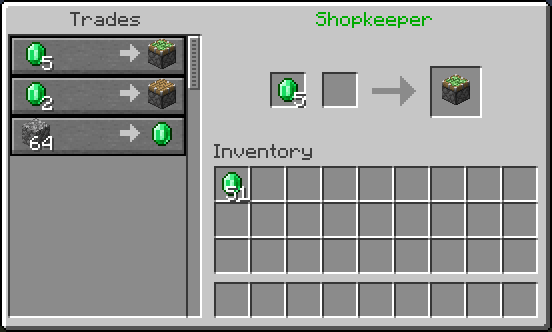
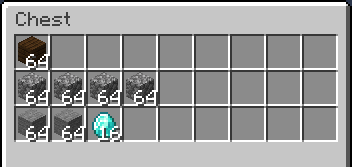
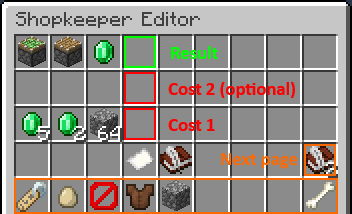
Shopkeepers let you set up item-for-item trades using a hired Wandering Trader and a linked container. See the illustrated setup below.

⚄Diamonds, votes & rewardsSupport the server and earn rewards+

Diamonds are used for player trading and the CoinFlip game. Each vote earns 1 diamond and 1 vote point. Spend vote points in /voteshop; claim blocks are available now, and more rewards may be added later. ExcellentCrates offer cosmetics and items without overpowered gear. ChatGames also reward diamonds to the fastest or most knowledgeable player.

☁Player warps & teleportingMeet up with other players+

Essentials provides homes (up to 3), player teleport requests, and teleport-to-you requests. Player warps are public destinations players can create and share; each player can have up to 3. Use /pwarp to see the commands available in-game.

☾Death chests & recoveryKnow what is and isn’t saved+

AngelChest protects your death chest indefinitely, including during PvP, but it does not save experience. Use /actp for its player access feature. If a server issue caused your death, staff may restore lost items. Deaths caused by player error aren’t eligible for server-related restoration.

⟳Restart reminders & updatesStay in the loop in-game+

The in-game changelog keeps server updates available right in Minecraft, so you don’t need to visit Discord or the website every time something changes. On supported newer Minecraft versions, updates appear through a custom screen/dialog. DiceCustomPlugin also announces scheduled restarts up to 24 hours ahead and shows a boss-bar countdown as restart time approaches.

◉Voice, chat & custom looksMore ways to hang out+

DiscordSRV syncs in-game chat with Discord; use /link to connect your account. InteractiveChat supports item, inventory, Ender Chest, and ping tags in chat; its Discord add-on brings supported previews to Discord too. Voice chat is Java-only. ItemsAdder adds custom textures, items, and cosmetics. New cosmetics have just been added, with more coming soon.

◇Crossplay & versionsJava and Bedrock together+

Geyser and Floodgate let Bedrock players join the Java server; gameplay mechanics follow Java. ViaVersion and ViaBackwards support other client versions, but items or textures may look different when your game version is older or newer than the server. For best results, Java players should use 1.21.11 and Bedrock players the latest version.

♢Other handy detailsSmall things worth knowing+

Clumps combines nearby experience orbs into fewer, larger orbs to make XP collection smoother and reduce the number of entities on the ground. Simple_RTP can send you to a random location in the Overworld; random teleport is disabled in the Nether and End. SkinsRestorer lets players using offline-mode clients display custom skins. CoreProtect keeps activity logs for staff investigations. nLogin adds account authentication because the server runs in offline mode. Balloons from DiceCustomPlugin follow your character around.

✧AFK rewardsEarn rewards while idling+

Visit /warp afk or use /afk to access AFK rewards. Listed reward chances:

  • 50%1 Iron
  • 25%1 Diamond
  • 10%50 Claim Blocks
  • 0.1%1 Netherite Scrap
⬡Server protectionProtected by Vulcan+

DiceSMP is protected by Vulcan.

PLAYER-TO-PLAYER SHOPS

Set up a Shopkeeper

Make an item-for-item shop using a Wandering Trader and a container.

  1. 01

    Hire a Wandering Trader

    Hold 32 emeralds and shift-right-click a Wandering Trader to hire them. Place a chest, double chest, or barrel for the shop’s stock.

  2. 02

    Link the stock container

    Hold the trader egg and right-click the container you placed. Then place the trader where you want them to stand. Each trader can link to one container.

  3. 03

    Stock items and set the trade

    Put the items you want to sell into the linked container. Shift-right-click your trader to open the editor. Set the Result (what the customer receives), Cost 1 (the required payment), and optional Cost 2. Click item stacks to adjust trade quantities, up to 64. You need at least one item for each trade slot you configure.

THE OFFICIAL RULES

Minecraft server rules

These are the official DiceSMP rules. Please read them before playing.

!

Immediate IP ban: Breaking any rule below results in an automatic IP ban. The server uses automated logging, and the owner states there are no exceptions or warnings.

01

Server & community

Help keep the community kind, friendly, and peaceful.

  • Respect each other. Treat all players with kindness. Bullying, harassment, and toxic behavior are not tolerated.
  • No below-the-belt jokes. Keep chat friendly. Offensive, highly personal, or deeply hurtful jokes are prohibited.
  • No drama. Keep personal arguments out of global chat so the community stays peaceful and fun.
02

In-game gameplay

Play fairly and don’t use traps or exploits against other players.

  • No cheating. Modded clients, X-ray packs, hacked clients, and unapproved third-party modifications are forbidden.
  • No duping. Do not exploit game mechanics or glitches to duplicate items, blocks, or currency.
  • No spam killing. Do not repeatedly kill the same player to ruin their experience or farm them.
  • No TP trapping. Do not set traps that instantly kill players who accept a teleport request using /tpa.
  • No AngelChest trapping. Do not trap another player’s AngelChest or build around or underneath it to steal their gear or kill them when they retrieve it.
  • No pWarp voids. Do not set a player warp with /pwarp that sends players directly into the void, lava, or a fatal drop.
03

Performance & farm restrictions

Build responsibly and protect server performance.

  • No overpowered farms. Massive, unrestricted automated farms that consume excessive server resources are not allowed.
  • No iron farms. Traditional and villager-based iron golem farms are prohibited.
  • No lag machines. Redstone loops, entity crammers, or other contraptions designed to reduce server TPS are prohibited and result in a permanent ban.

For reports, concerns, or questions, open a ticket in the DiceSMP Discord ↗.

EXPLORE, BUILD, MAKE IT HOME

World & claims

Know where to build, how protection works, and what changes over time.

▦

Overworld

The Overworld is 10,000 × 10,000 blocks. Use /rtp for a random Overworld destination.

♨

Nether

The Nether resets monthly. Builds there are deleted at reset, so avoid leaving anything you want to keep.

◉

End

The End also resets monthly. Builds there are deleted at reset. Log out carefully: after a reset, you could next spawn over the void.

⌂

Your claims

Protect land with a golden shovel. You can own up to 2 separate claims, then expand them as needed. Claim blocks accumulate at 100 per hour played; voting rewards points you can exchange for more.

⟳
A FRESH FRONTIER EACH MONTH

Nether & End resets

The Nether and End reset monthly. Any builds in those dimensions are removed when the reset happens. Bring home anything you want to keep, and take extra care when logging out in the End so you don’t return above the void after it resets.

QUICK ANSWERS

Frequently asked questions

Still stuck? The Discord ticket team can help.

Can Java and Bedrock players play together?+

Yes. Join play.dicesmp.online. Bedrock uses port 12011. Server mechanics are based on Java Edition.

How many claims and homes can I have?+

You can have 2 separate land claims and up to 3 homes. Claims can be expanded with more claim blocks.

When do the Nether and End reset?+

Both dimensions reset monthly. Builds there are deleted, so keep anything important in the Overworld first.

Does AngelChest keep my experience?+

No. It protects your items in a death chest but does not save experience.

How do I report a player or a server problem?+

Open a ticket in the DiceSMP Discord for reports, concerns, bugs, or suggestions.

What if I died because of a server issue?+

Contact staff through a Discord ticket. Staff can restore items when the death was caused by a server issue, not player error.

⚄
WE’RE HERE TO HELP

Something still unclear?

Open a Discord ticket for reports, concerns, bugs, suggestions, or questions about the server.

Open a ticket ↗